
iPod, iPhone, iPad and all things i-related
 More and more search results are being delivered through iPad (and look-alikes): does the old ‘I search, you give results’ paradigm changed in any way?
Mashable reports on this topic quoting Norman Winarsky, longtime search expert and co-founder of a personal assistant startup (SRI) that was acquired by Apple.
“Tablets enable a full, interactive experience that involves not only text, but potentially speech and interactions,” he says.
Search on tablets will incorporate how you engage with your tablet’s touchscreen, front and back cameras and microphone. “Where are you looking? What are you seeing? How much time are you spending reading?,” he says as ways to imagine new avenues for search on tablets.
What’s next?
The future of search, as pioneered by the tablet’s form factor, is the dynamic interaction among all of your senses, foretells Winarsky.
Winarsky’s predictions aren’t all that far fetched, especially if you align yourself with the camp that believes that tablets will replace laptops and PCs as the primary devices for personal computing purposes.
Forrester, for one, estimates that tablet sales will total 195 million between 2010 and 2015, with tablet sales eclipsing laptop sales by 2015. Apple is currently dominating the market; it alone sold 9.25 million iPads in its fiscal third quarter — the company’s best quarter ever.
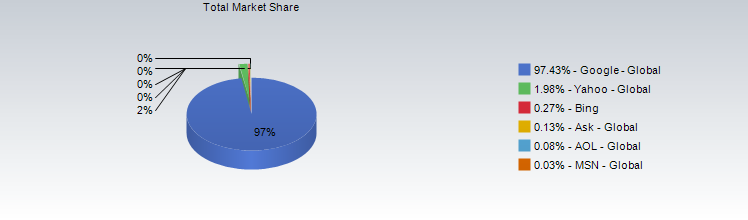
What is the most used search engine on iPad alone?
Check this interesting report (and graph) from SearchTerms:
[Via Mashable]

 When it was released, a long time ago, Skype for iPhone has turned on high expectations around a specifically-designed version for iPad which was announced and never released for a loooong time.
Now the wait is over! iPad owner can now download the very iPad-only Skype version on iTunes App Store!
Was it worth the wait? Let’s see.
Skype for iPad leverages the huge screen estate, enabling a completely different communication experience with the world-leading VoIP software, be it with video-calling features or in chat mode.
Some features have been customized for the iPad-version, making it somehow unique among all others (PC and Mac included): it’s quite basic but it’s fully functional – with some little extras.
In fact, you’re now able to send chat messages in the middle of a video-call, use emoticons, easily find your contacts by means of a “contact grid” with large-size avatar pictures.
Right now, there’s no way to get a list-view of your contacts if you happen, like us, to have a looong list of them.
Browsing through recent converstation is now a lot easier, thanks to a enhanced one-key searching feature.
Paid services like SMS sending, are now a lot easier to use: you just open a contact and select Send SMS
Moreover, iPad 2 users, will enjoy the fact that both camera, front and back, are now available for voice and video calling!
Skype for iPad works on both 3G and Wi-Fi networks: that’s the biggest difference with Facetime, right now, which needs a Wi-Fi-only connection.
Call quality is definitely good, even on 3G connection, just like it was on the iPhone version; we’re now using Skype for iPad on a daily basis: all in all it was really worth the wait!
Download Skype for iPad now for free in iTunes Store!
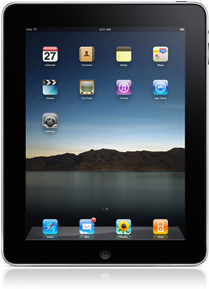 Blog Artatm just published a nice selection of iPad Wallpapers just to enhance the basic and default wallpaper of yours!
Check and download all iPad wallpapers here!
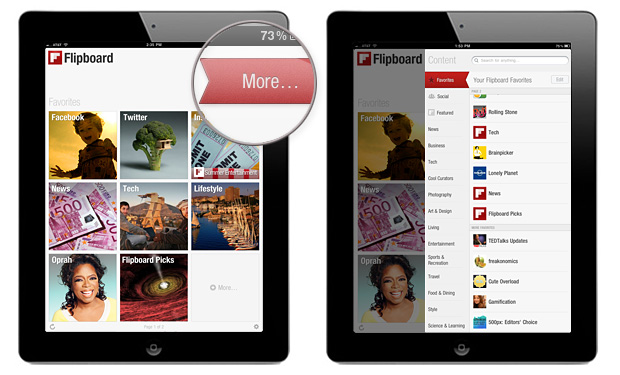 Flipboard has been a long-time favorite here at theiFile.com.
Today they’re announcing the new content guide!
Tap on the red ribbon at the top of your Flipboard to open the Content Guide. Here you can quickly browse great content, add social networks, or use the search bar to find any topic, blog, or person you want to check-out on Flipboard.
 This time may be the right time: the iPad (specifically the iPad 2) is getting an iPad-specific version of the beloved Skype app – with working cameras!
That’s cool for most users that still haven’t moved to the Facetime side of modern communication!
ZDNet has been able to preview the iPad-specific version of the Skype app and published several new pics along some pretty info.
Performance issues and worries?
Although Skype for iPad will work on both iPad versions, you’ll only be able to broadcast video from the iPad 2, since it has a front-facing camera.
You can still receive video on an original iPad. Skype for iPad will work on both Wi-Fi and 3G, but it was quick to point out that video quality might take a hit on slower 3G connections, and we were quick to verify that Skype quality is often subpar over 3G.
Check here for more info and here for full Skype for iPad preview.
Available – for free – starting June 28th!
